
6 Useful ChatGPT Prompts for Schema Markup
 Itamar Blauer5 min read
Schema markup is arguably the best way to provide more context to search engines about the content of your website and its pages.
It’s essentially code that describes code.
One of my favourite use cases of AI tools like ChatGPT and Claude is to help generate, debug, and scale schema markup. The prompts in this article work across all major AI tools - ChatGPT, Claude, Gemini - though examples below use ChatGPT specifically.
ChatGPT prompts for schema markup
Make sure that when you generate schema markup with ChatGPT, that you don’t forget to include the opening and closing script tags that are necessary if you want to implement your schema markup.
Opening tag: <script type="application/ld+json">
Closing tag: </script>
With that out of the way, here are some useful ChatGPT prompts for schema markup:
1. Generating ideas for schema types
This is ideal if you are starting out and aren’t sure what schema types you should be using for your website. You can get away with being a bit more generic here, but it doesn’t hurt to specify exactly what pages you want the schema markup on, as well as what you want it to achieve e.g. to demonstrate that we have an offer for a limited time. Here is a prompt template to use:
I want to create JSON-LD schema markup for my B2C/B2B website, X (URL) that provides X. Provide me with some specific schema markup types that is relevant to my industry and what my offerings are. Be sure to look into the ‘More specific Types’ that Schema.org suggests to find the one most applicable to my situation.
2. Generating schema using predetermined values
This works best when you’ve found a schema type you want to use and have noted down the properties and values that you want to include. At this point you should be very specific with the prompt and outline exactly what you want included. Here is an example prompt for generating Recipe schema:
Generate Recipe schema markup in JSON-LD using the following properties and their values:
name: Chocolate chip cookies
url: https://www.itamarblauer.com/cookies-recipe
author: Itamar Blauer
sameAs: https://www.linkedin.com/in/itamarblauer/
cookTime: 1 hour
cookingMethod: Baking
recipeIngredient: Chocolate and stuff
about: chocolate chip cookies
sameAs: https://www.wikidata.org/wiki/Q14169302 and https://en.wikipedia.org/wiki/Chocolate\_chip\_cookie
Don’t forget to include the opening and closing JSON-LD script tags
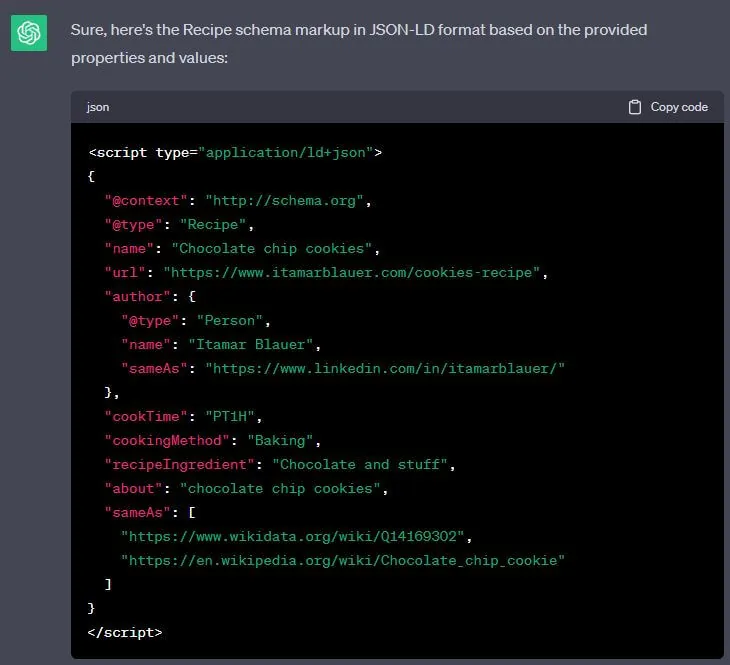
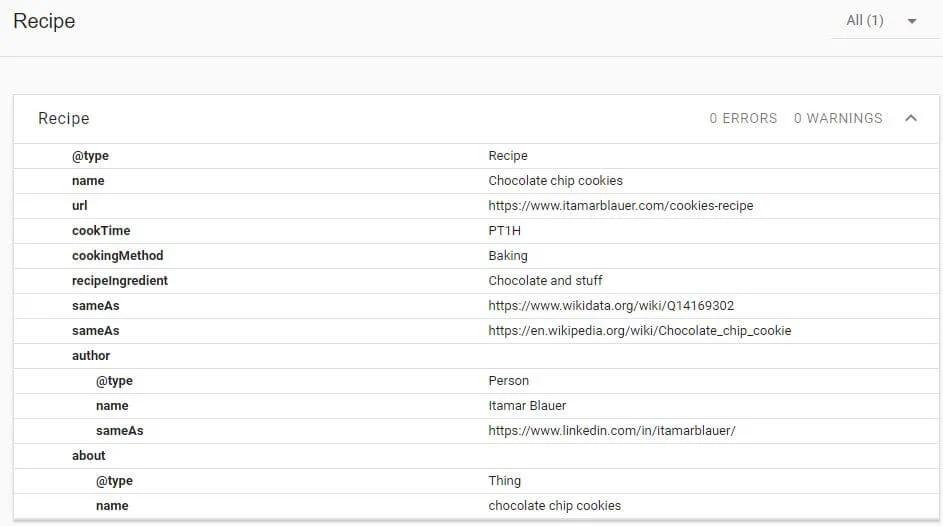
This prompt worked and displayed 0 errors.
3. Generating ideas for additional properties to include
If you’re not fully sure that you have actually used all the relevant properties for your case, after you get the output from the above prompt, you can ask ChatGPT the following:
What additional properties would you recommend including in addition to the schema you have just displayed?
4. Fixing schema
If you did some tinkering in the Schema Markup validator tool and saw there are errors, you can try this prompt:
Fix this schema:
*paste schema here*
Then, check the new output with the validator tool to see if it worked (which it usually does).
5. Scaling schema
To scale schema markup across multiple pages, you have two approaches depending on how many pages you’re dealing with.
For smaller batches (under 20 pages): Paste your page details directly into the chat as a structured list and ask ChatGPT to generate separate schema blocks for each one. This works well for product pages, FAQs, or location pages.
For larger batches: Create a spreadsheet with the properties in the first column and values in the second, with a separate tab for each page. Upload the file directly into ChatGPT (file upload is available on all paid plans) and use the following prompt:
There are multiple tabs in this file. The first column contains the properties and the second column contains their values. Generate [schema type] schema separately for each of the tabs using all of the tabs. Don’t forget to include the opening and closing JSON-LD script tags for each one.
Once you have the outputs, validate each one using the Schema Markup Validator before implementing.
Note: The specific UI for file uploads in ChatGPT has changed several times since this post was first written. If you can’t find the upload option, look for the paperclip icon or the “+” button in the chat input area.
6. Optimising schema for AI Overviews
With Google’s AI Overviews now appearing for a significant proportion of queries, schema markup has become even more important as a signal for what your content is about.
Structured data helps Google’s AI understand your content well enough to pull it into an Overview and attribute it correctly. The schema types most relevant here are FAQPage, HowTo, Article, and speakable (for audio-ready content).
This prompt helps you identify whether your existing schema is well-positioned for AI Overview inclusion:
Here is the schema markup currently on my page: [paste schema]. My target keyword is [keyword]. Based on what Google’s AI Overviews tend to surface for this type of query, what changes or additions would you recommend to improve the chances of this content being cited in an AI Overview?
This won’t give you a guaranteed result (nothing does), but it’s a useful sense-check to make sure your structured data is as complete and specific as it can be.
Deck: Generating complex schema markup at scale with AI
Here is the deck related to this topic that I delivered at brightonSEO on 14th September 2023:
Conclusion
The use of ChatGPT and AI can help with the generation, troubleshooting and scaling of schema markup.
However, the most important concept to remember is GIGO (garbage in, garbage out).
If you prompt badly, you’ll not get your desired output.
Have fun experimenting with these prompts, and if you need additional SEO help, you can always count on an SEO consultant!