
YouTube SEO: The Ultimate Guide
 Itamar Blauer26 min read
Editor’s note (updated July 2026): I wrote this guide in 2021, and YouTube has changed a lot since - Shorts took over, YouTube Studio gained a proper keyword research tool, tags stopped mattering, and AI now decides more of what gets watched than ever. I’ve updated the guide throughout and added new sections on Shorts and the AI era.
I first started making YouTube videos in 2008.
Back then, life was simple.
It was easy to get views and become known within a niche.
It was easy to get subscribers and build up an audience.
But now, things are much harder.
The YouTube algorithm has become very complex, weighing in various factors that dictate how well a video will rank on the platform.
Not to mention how much competition there is nowadays on YouTube, with many creators struggling to optimise their videos to reach their intended audiences.
Yet, YouTube is the world’s biggest video platform, the second-most visited website on the planet, and its videos now show up everywhere from Google’s AI Overviews to your TV screen - so there’s a lot to cover when it comes to ranking high on YouTube.
If you’d prefer to watch this YouTube SEO guide, here’s the YouTube video:
For those that love a good ol’ read, let’s begin.
Google SEO vs YouTube SEO
Many people believe that you have to apply the same SEO practices to both Google and YouTube.
This is wrong, and there are fundamental differences between the two.
Apart from YouTube having an infinite scroll layout and being much more difficult to monitor and predict than Google, here are some key differences:
Technical elements
Google SEO is all to do with websites, which are unique and have varying levels of technical, on-page, and off-page elements.
YouTube videos, on the other hand, are all hosted on one platform, which provides an even ground for all content creators.
This means that no one video can be “technically stronger” than another, so the concept of technical SEO for YouTube videos is pretty much eliminated from the conversation.
Off-page SEO
Off-page SEO is something that is way more important for Google SEO than YouTube SEO.
Reason being, I don’t think that links matter for YouTube videos as much as they do for websites.
You can build 100s of links to a YouTube video, but that doesn’t necessarily mean that people will click through to the video and it’ll have lots of views.
Engagement
A large part of YouTube SEO is about the engagement of a video - be it the likes, comments, and shares of a video.
You don’t see websites being ranked number 1 on Google because they have lots of comments on them.
YouTube takes engagement far more seriously than Google does, because engagement is what keeps users on YouTube (and that’s how they make more money).
Traffic sources
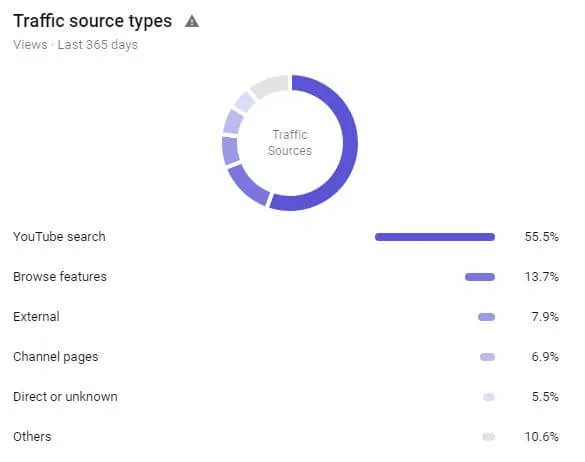
YouTube videos have far more organic reach than websites because of the different traffic sources that people can stumble across your videos from.
If we exclude the YouTube search, you can still find videos organically through browse features and suggested videos.
Considering the nature of YouTube as a platform, it identifies the content you like and will show you more of it - often leading to the discovery of different content creators.
Common YouTube SEO mistakes
There are many mistakes that I see YouTubers make that limit their organic growth.
Here are some common YouTube SEO mistakes from my experience that you should watch out for:
Mistake #1 - Overlooking keywords
Keywords are incredibly important on YouTube because it’s not just about how you optimise metadata - it’s also about the spoken words in the video itself.
Videos are fundamentally classified based on the keywords that they relate to, and many YouTubers overlook just how important keywords play a part in YouTube SEO.
Keywords for SEO are key on both Google and YouTube, but there are many instances whereby a YouTube video doesn’t audibly mention the keywords it is trying to rank for.
Mistake #2 - Being too broad
It’s fine if you have many different hobbies, from skateboarding and skiing to reviewing gadgets and playing video games.
What’s not fine is when your YouTube channel contains videos about all of these things.
In simple terms, if someone is subscribing to your channel because they saw you playing a video game they like, they’re most likely only going to be interested in the video game content.
When you start uploading videos about skateboarding, the subscriber will either not watch your video (bad signal to YouTube) or unsubscribe (another bad signal to YouTube).
When you create a YouTube channel, pick one niche and stick to it.
However, some niches have different aspects to them, such as a digital marketing YouTube channel that uploads videos around SEO, PPC, content marketing, etc.
This is fine to have, as the audience might be interested in these other topics.
Mistake #3 - Avoiding CTAs
Prompts create actions, and that’s why call-to-actions are key on YouTube.
Whether they’re used to get likes on a video or a new subscriber, you should always remember to prompt your audience to perform an action.
Ideally, you’d do this once or twice (at the beginning and end of a video), but keep in mind that the best types of CTAs are audible and have some kind of visual presence on the screen.
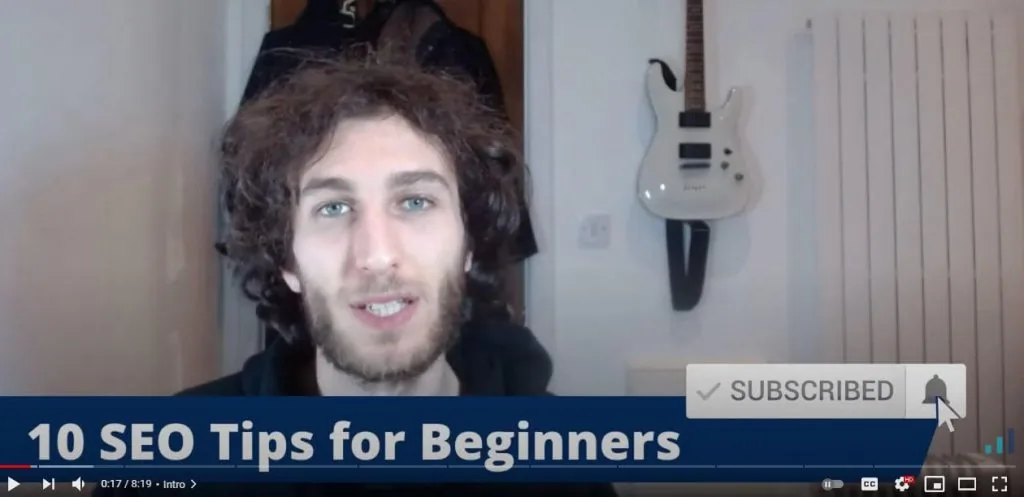
I tend to do this with all of my videos, and you can see from the example above that I’ll have an animation of someone clicking the subscribe button whilst I’m audibly using the CTA for people to subscribe.
Whilst it’s important not to forget about CTAs, don’t use too many in your video - it will alienate your audience and they’ll end up not taking you seriously!
Mistake #4 - Forgetting to add custom thumbnails
Custom thumbnails get more clicks than the randomly selected three options you have from the video you upload.
Click-through-rate (CTR) is an important YouTube SEO metric, yet many people will either forget to add a custom thumbnail, or simply create one that looks terrible.
No offence to whoever created the above thumbnail, but I personally wouldn’t use it!
How to find your audience on YouTube
A question that often comes up from new YouTubers is “how do I find my audience?”
Luckily, there are some steps you can take to identify your audience on YouTube.
The Research tab in YouTube Studio
(This section originally covered Google’s Find My Audience tool, which has since been retired - what replaced it is far better.)
YouTube Studio now has a Research tab (under Analytics) that shows what viewers - on your channel and across YouTube - are actually searching for.
The best part is the content gaps feature, which flags searches where viewers aren’t finding satisfying results.
That’s essentially YouTube handing you a list of videos it wants someone to make.
Start there before you plan any new video: it’s real search behaviour straight from the source, rather than guesswork.
The 3-step approach to identifying your YouTube audience
Another way you can identify your audience on YouTube is by taking this 3-step approach:
Step 1: Know who you’re targeting
The first step is all about the who.
When you pick a niche, it’s worth coming up with personas of who your ideal audience member is.
You should also ask yourself “will this person actively look for my videos on YouTube?”
Step 2: Know what they’re searching for
Once you know who it is you’re targeting, you need to gather information about what videos are currently out there.
Find out what current videos exist, but also how well these videos perform.
Take a look into their engagement, seeing the amount of likes and comments, as well as taking note of the video view count as a percentage of the channel’s subscriber count.
This approach will help you identify any gaps in the content that you can fill with a video that better matches the viewer’s intent.
Step 3: Create and optimise videos accordingly
The final step is to produce your own content that is better than what is currently out there.
You should optimise it correctly so that you capture the maximum amount of relevant viewers.
But how do you optimise YouTube videos?
Well, first we need to understand a bit about keyword research and its role within YouTube SEO.
YouTube keyword research
If you’ve done Google SEO in the past for websites, then you know the importance of keyword research at the start of an SEO strategy.
The only problem with YouTube is that you still can’t get a truly accurate monthly search volume for YouTube keywords.
Some SEO tools will claim to have these figures, but they’re either using clickstream data or simply display the Google search volumes (which are often very different). The closest thing to real data is the Research tab in YouTube Studio (covered above), which shows search interest and content gaps straight from YouTube itself.
So, how do you perform YouTube keyword research?
Alongside the Research tab, there are two things that I look into: YouTube search predictions and Google Trends.
YouTube search predictions
When you start typing into the YouTube search box, you’ll get some autocomplete suggestions that relate to whatever it is you’re typing.
These predictions are accurate and generally up-to-date, which provides you with a good direction towards targeting particular keywords.
You can also check for more keywords with the underscore _ key.
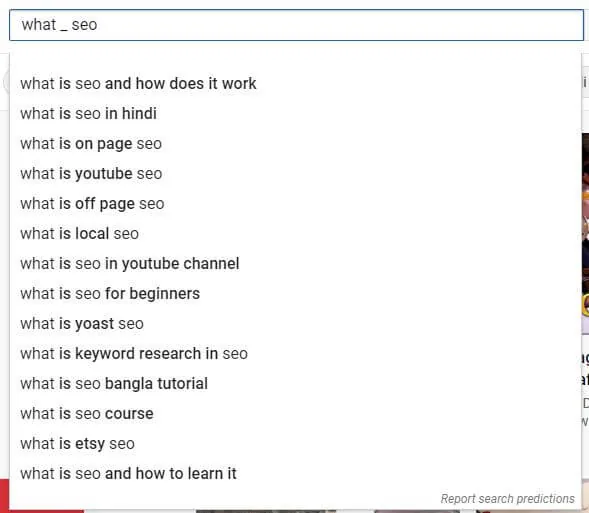
Try to use a variation of keywords within the YouTube search box, and this will help you identify if there’s a need for the video you plan to make.
It can also give you ideas of new videos that you haven’t thought of yet.
Google Trends
Google Trends is a free tool that lets you find trending topics.
You can filter it by the country and time period, as well as comparing different topics.
The niftiest feature in Google Trends is that you can filter these results for YouTube search.
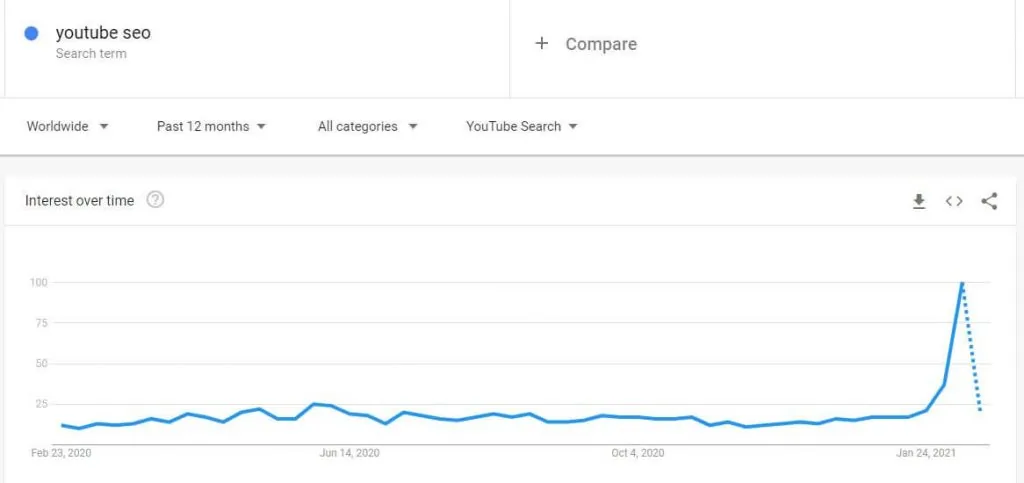
From this data I can gather that lots of people are looking more into YouTube SEO (which is good news!)
When performing your keyword research for YouTube SEO, consider using the keywords you’ve identified within the YouTube search predictions along with Google Trends for the overarching topic.
Optimising YouTube metadata
There are lots of different metadata that can be optimised on YouTube, both on the channel and individual videos.
Let’s take a look at each specific metadata on YouTube and how exactly to optimise it.
Channel keywords
You can choose the keywords that relate to your entire YouTube channel by going into the YouTube Studio -> Settings -> Channel.
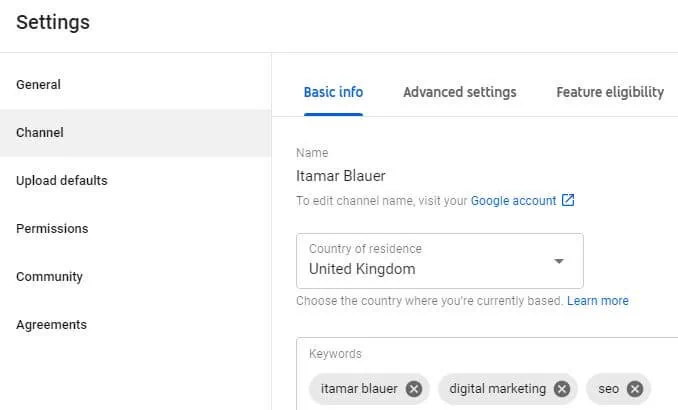
This is important to set up when you start out because it will signal to YouTube that your content will relate to these topic areas.
It can also imply that people who watch videos related to your channel keywords will find you via YouTube search, suggested videos, or browse features.
Channel category
Once you have set up your channel keywords, it’s important to set your channel category.
This will better signal what type of content you intend to create, therefore, it helps YouTube to display your videos to the right people.
You can choose your channel category by going into the YouTube Studio -> Settings -> Upload defaults -> Advanced settings.
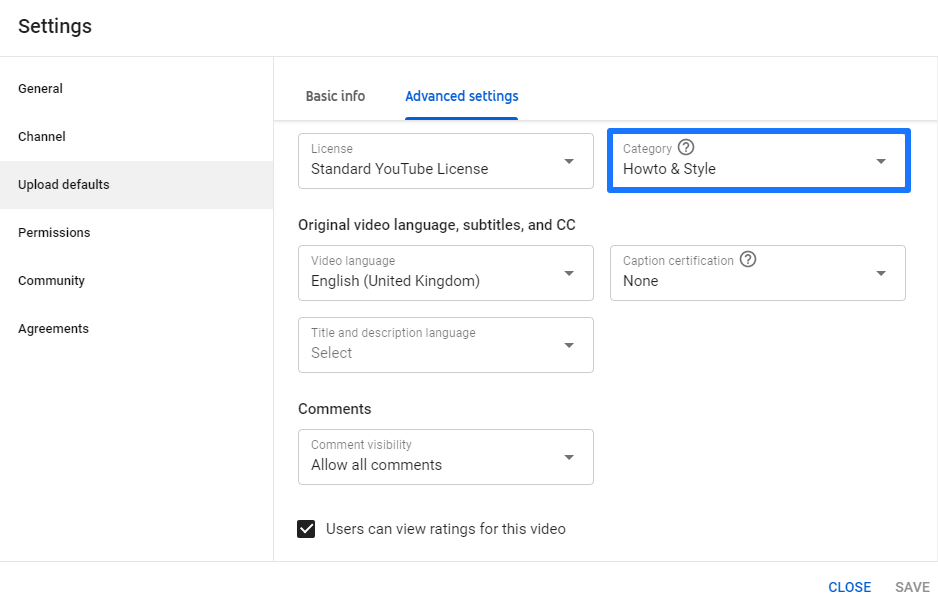
The ability to choose only one channel category further reinforces how important it is to stick to one niche, otherwise you’ll confuse your audience.
Channel description
Many people forget to optimise their channel description.
YouTube retired the dedicated “About” tab back in 2023 - your channel info now lives in the “more about this channel” panel, which you edit via YouTube Studio -> Customisation. That’s where your channel description, links, and contact details sit.
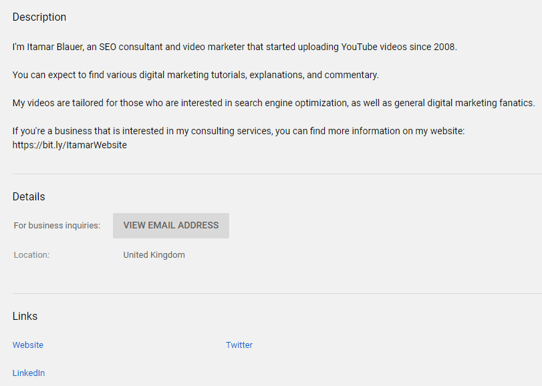
(The screenshot above shows the old About tab layout - the fields are the same, they’ve just moved.)
Try to be as descriptive as you can in your channel description, as the keywords that you enter here will also help validate your content topics, as well as provide your audience with a greater insight into you as a content creator.
Video title
Your YouTube video title needs to be optimised as it will capture the attention of the user, and they’ll take a split second to decide whether to watch your video or not.
Try to include your main keyword(s) in the title and keep all of your titles consistent.
You should try to use title case for professionalism (or if you want to use clickbait you can USE ALL CAPS *SHOCKING*).

Notice how in this title I’ve used a variety of relevant keywords, such as How to Get Customers, How to Get Customers for Your Business, and Online Brand Communities.

It’s also a good idea to update your video titles if the information in them is still relevant, as you can see the year at the end of the title got updated for 2021 from 2020.
Video thumbnail
Similarly to the title, your video thumbnail will massively influence the CTR of your video.
Thumbnails should be relevant to the video (otherwise people will quickly stop watching the video) and consistent across your channel.
It’s important to use your brand colours in the thumbnails to signal to your audience that they know whose video it is that they’re about to watch.
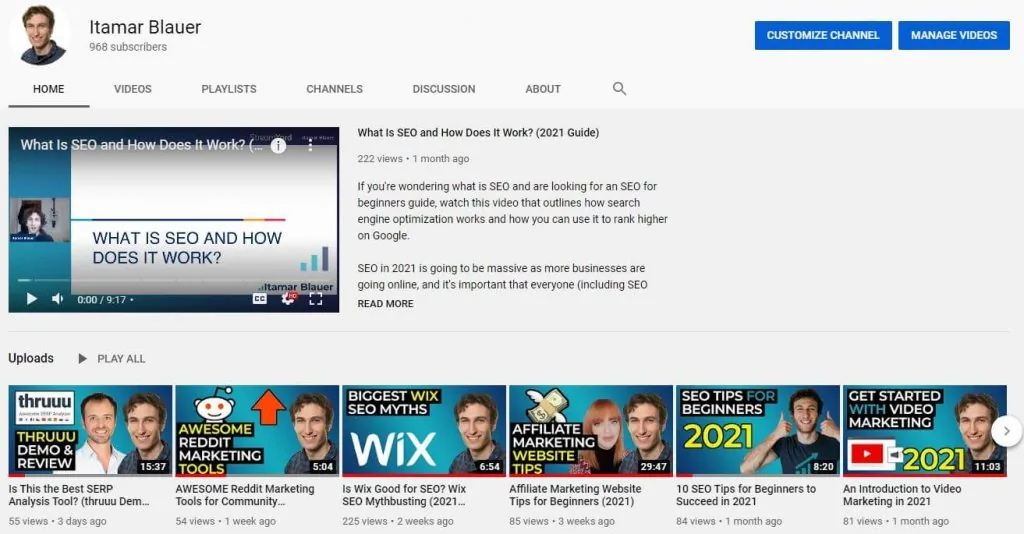
To create custom thumbnails, you can use free tools like Canva or paid tools like Photoshop.
Video description
The video description is where you can add the majority of text to better describe your video and incorporate as many relevant keywords as you can.
Your main keyword(s) should be included at different parts of your video description, and it’s important to initially include them towards the start of the description.
There are other things you can do to better improve your video descriptions, such as by adding timestamps and/or adding hashtags.
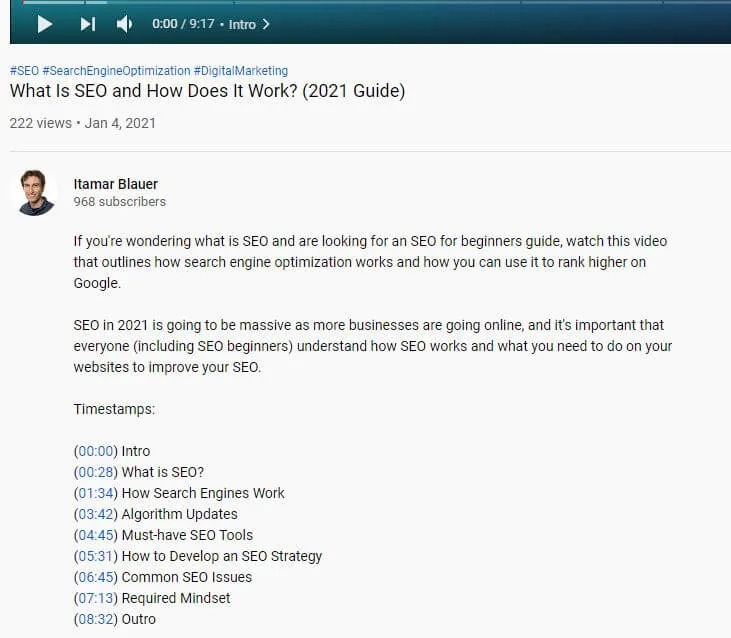
The timestamps that you add will help users better navigate throughout the video, and when you include hashtags in your video description (ideally at the end), the first three will show up above the video title.
Try not to add more than 15 hashtags (although I don’t see why you would).
Remember that your video description can also include more information about you, as well as links to other areas of the web e.g. website, social media profiles, etc.
Video tags
Let me be honest with you: tags barely matter anymore.
YouTube itself has said tags play a minimal role in discovery - the algorithm understands your video from its title, description, captions and (most importantly) what’s actually said in it. Add a handful of relevant tags to cover spelling variations of your name or brand, then move on.
Tags are limited to 500 characters, but nowadays you shouldn’t be spending more than a minute on them.
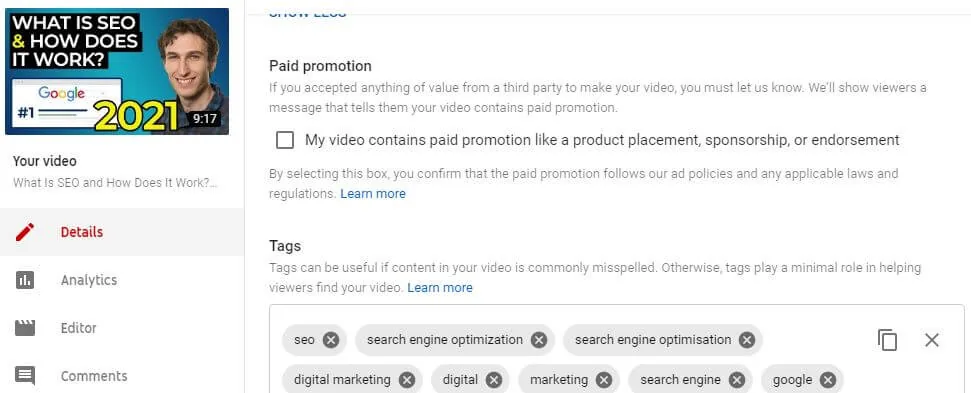
It can be difficult to find where to add your video tags, so you can access them by going into the YouTube Studio -> Content -> Your video -> Details -> Scroll down and click SHOW MORE.
If you want inspiration from your competitors, you can see which keywords they include in their videos by using the Keywords Everywhere Chrome extension.
Video subtitles and CC
The subtitles and closed captions for your video can also provide a lot of information to YouTube about what is being said in your video.
Remember that the YouTube bot doesn’t watch your video, but it can detect what is being said.
YouTube will automatically generate subtitles for your videos, but you can add them manually by navigating to underneath where you can change the video tags.
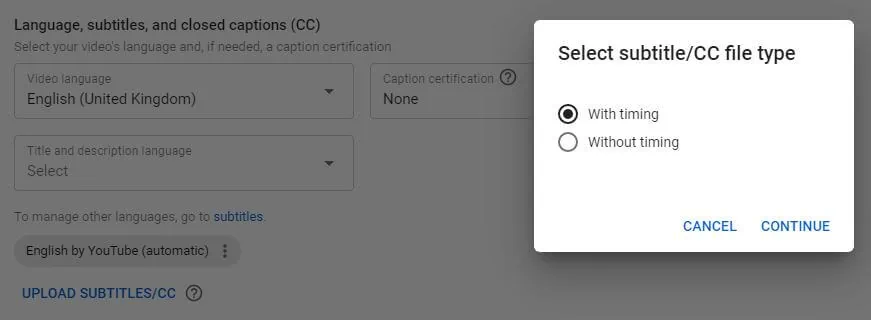
If you choose to upload a subtitle/CC file manually, check this guide on the supported files you can use.
Advanced YouTube SEO tricks
I’ve looked around the internet to see what others are saying about YouTube SEO, and frankly, there are quite a few tricks that nobody seems to have brought up.
This part of the guide will pinpoint some lesser-known and advanced YouTube SEO tricks that *might* blow your mind.
Trick #1 - Adding competitors in your video tags
This is quite a bizarre thing to do - and it is.
But, the reason you might want to add your competitors’ names in your video tags is because your video might show up on the suggested videos section if someone is watching one of your competitor’s videos.
It can also display your videos via browse features and/or YouTube search.
However, I wouldn’t go overboard with this and have all of your competitors appearing in all of your video tags, so the best way to approach this is to test it out when you upload a video that is similar (or better) than one that your competition already has uploaded.
Here’s a recent test that I did which worked for me within minutes!
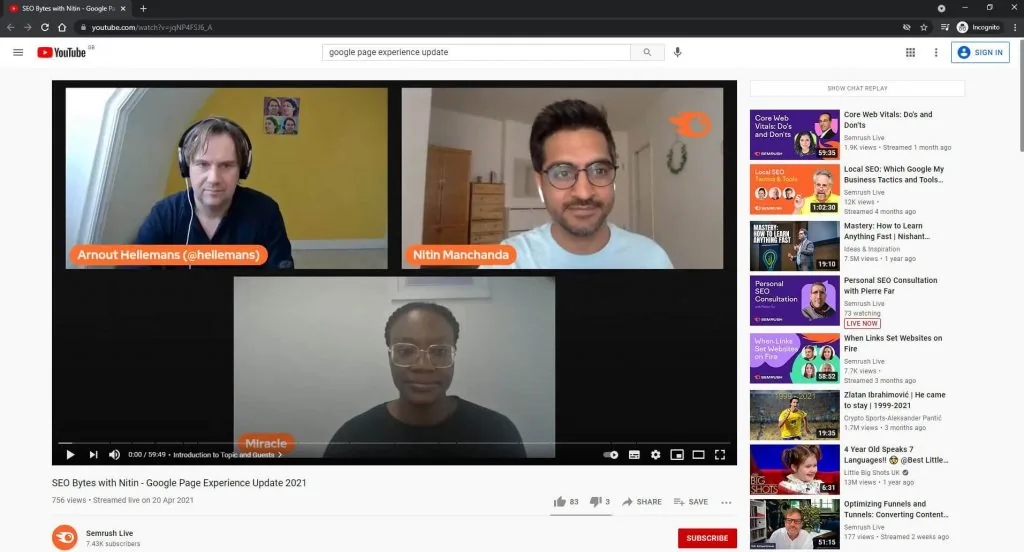
I found that Semrush Live had a video that was ranking well for the term google page experience update - so I wanted to capitalise on it.
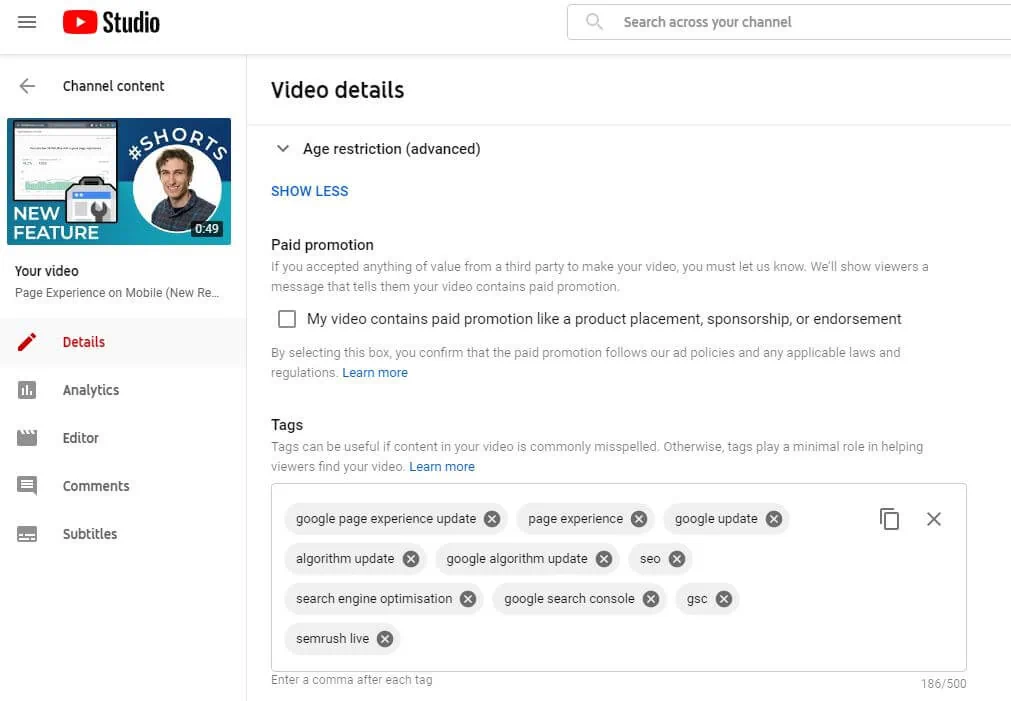
I had a related video that didn’t have as many views as the Semrush Live video, so I added Semrush Live to my video’s tags.
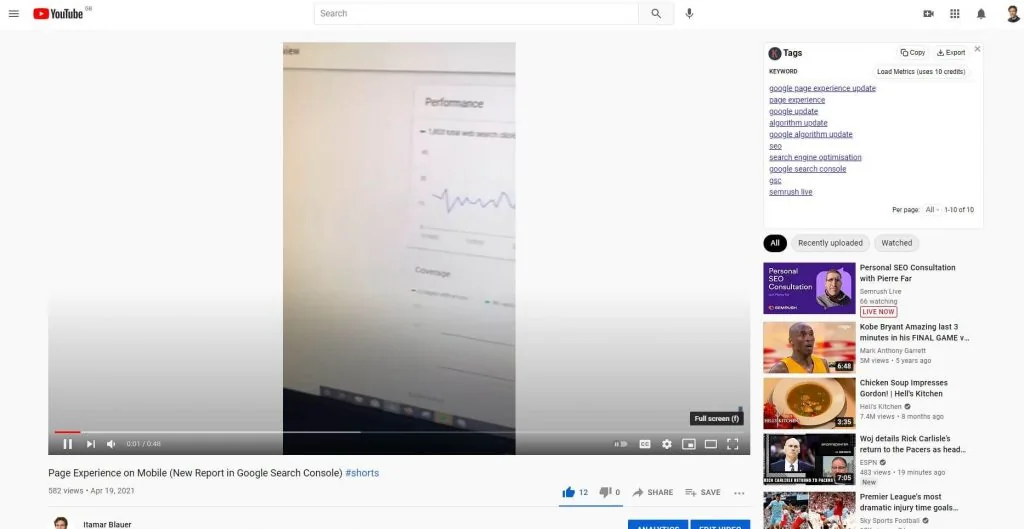
And here’s proof with the Keywords Everywhere Chrome extension enabled to show that I saved the changes to my video’s tags.
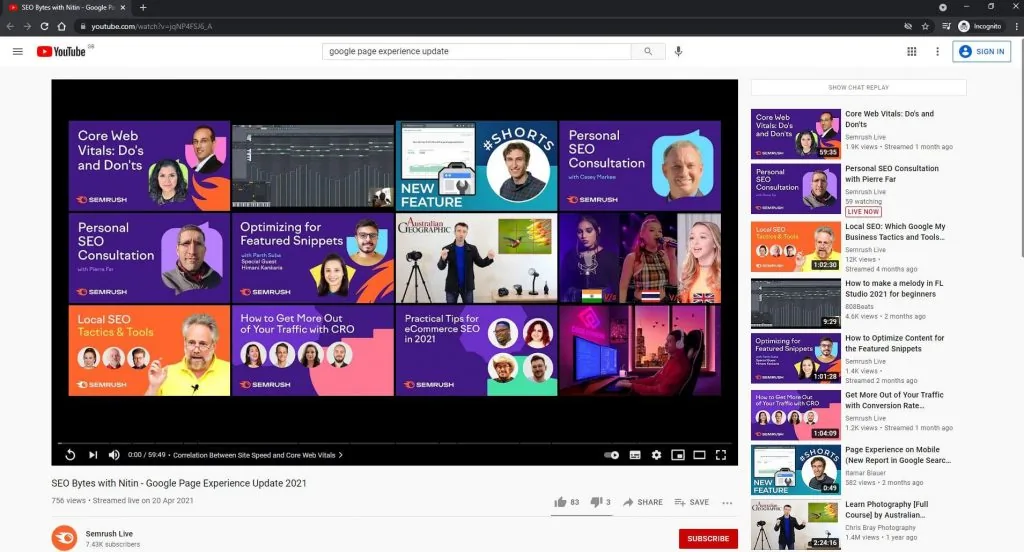
Within minutes I had gone into another incognito browser and found the Semrush Live video, but this time, my video was ranking in the suggested videos section and it was featured at the end of the Semrush Live video.
Pretty cool, huh?
2026 update: this test was from 2021, when tags carried more weight than they do now. Suggested videos today are driven almost entirely by watch behaviour - what people watch together, and for how long. The modern version of this trick is making content on the same topics as your bigger competitors and winning the click with a better thumbnail and title, so the algorithm learns your videos satisfy the same audience.
Trick #2 - Optimising the video and thumbnail file name
It’s not helpful if you’re uploading a video about marketing with the rendered video file being output1242.mp4 and the thumbnail file being IMG0024.jpg
This may seem obvious, but lots of people don’t optimise the file name for their videos and thumbnails.
Whilst there are limitations in terms of using special characters, the file name should include the main keyword(s) that you’re trying to rank for.
Most likely, this will be the title of the video that you’re uploading.

Trick #3 - Commenting on your competitor’s videos
This trick is definitely underused by many YouTubers, primarily because they don’t want to give their competitors more views.
However, commenting on your competitor’s videos can actually be beneficial to your own channel.
Reason being, their audience is most likely going to be interested in your content, so why not get your name out there and reel in some of their viewers to your channel?
The best way to approach this is to comment things that are actually relevant to the video that you’re watching - making it apparent that you’re adding value.
Doing so will probably get you more likes than other comments, which will further boost your comment to the top and get more people to see your brand.
I commented on an SEO video from a YouTuber with over 2,500 subscribers, adding value to what was already said in the video.
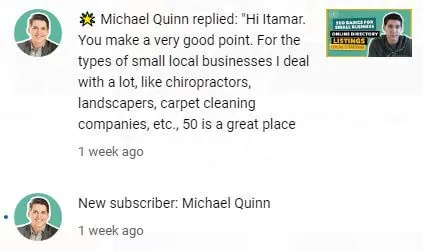
This creator found my comment helpful, and we had a nice conversation about the topic.
As a result, he even subscribed to me (which was awesome!)
Now, for those reading this that want to avoid appearing extremely deceitful, commenting on other people’s videos does act as support because you’re giving them engagement - so let’s all be nice to one another, ok?
Trick #4 - Using cards and end screens correctly
Cards and end screens aren’t novel, but their use cases are oftentimes misunderstood.
Many YouTubers will implement very generic end screens at the end of a video, but these don’t entice viewers to click through to watch another one of their videos.
Believe it or not, this acts as a bad signal to YouTube.
Your end screens should have relevant content to the video that it is being displayed on, and in turn, this should drive more engagement and better watch time for a channel.
Since watch time is one of the most important metrics for YouTube SEO, it’s a no-brainer that you should implement them effectively.
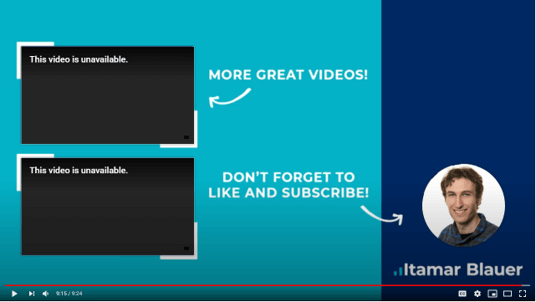
Consider creating an outro image/video within the last ~20 seconds of your video whereby you can display your end screen elements.
With cards, a lot of people don’t even use them, but whenever you make reference to another video of yours, use cards to prompt viewers to watch the referenced video.
It’ll get you more views, engagement, and generally provides a strong signal to YouTube that your content is great.
Trick #5 - Setting the video’s location
For any local businesses creating YouTube videos, you can set the location of your videos to match where you’re based.
This can help viewers who live nearby to access your videos and/or potentially come in and make a purchase.

You can find this setting by going into the YouTube Studio -> Content -> Your video -> Details -> Scroll down and click SHOW MORE.
However, if you’re creating content to a worldwide audience and don’t rely on bringing users in from any particular area, it’s perfectly fine to leave the video location as ‘None’.
Trick #6 - Going live on YouTube
Live videos get increased exposure from YouTube than regular uploaded videos.
It’s also far easier to get engagement during live videos with the live chat enabled.
The best part about live videos is that the views get combined from viewers that watched the live stream and those that watched the replay.
If you’re looking to get higher visibility in a relatively easy way, live videos are the way to go.
Of course, make sure that your live videos achieve a purpose and you can keep your viewers engaged throughout.
Trick #7 - Posting in the ‘Posts’ tab
YouTube renamed the Community tab to the Posts tab in early 2025 (not to be confused with the newer “Communities” feature, which is a separate conversation hub). It’s available to channels with advanced features enabled - and it lets you create posts that can engage your audience (even non-subscribed users).
You can essentially reach your viewers without having to create a video!
With community posts, you can share your latest video, create a poll, or ask questions to your audience.
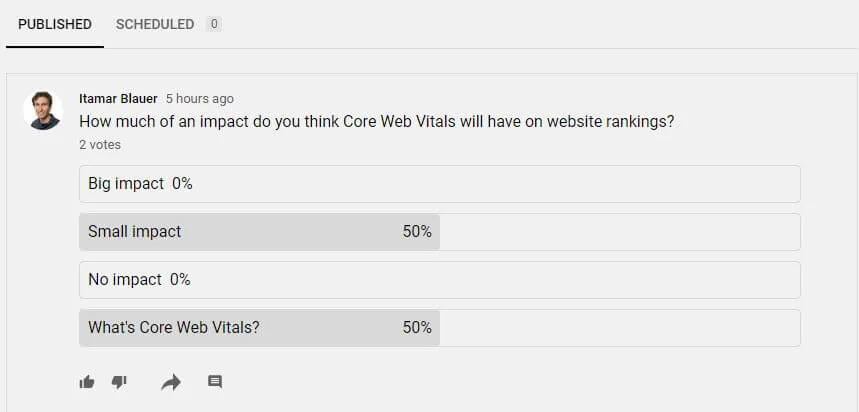
YouTube tends to show community posts prominently, and not many content creators bother making these posts, so start creating them regularly to increase your visibility on YouTube.
YouTube Shorts SEO
Shorts didn’t exist when I first wrote this guide. Now they’re the fastest way to get discovered on YouTube - and they play by different rules.
Shorts are served through their own swipe feed, where the algorithm decides what to show based almost entirely on engagement: how many people watch to the end, rewatch, like, and subscribe afterwards.
So what can you actually optimise?
The first two seconds matter most. Viewers swipe instantly, so open with the hook rather than an intro.
Say your keywords out loud too, because YouTube transcribes everything and the spoken words help it classify your Short. Titles still matter as well (Shorts appear in search results like any other video).
And here’s the one most people miss: you can attach a related long-form video to a Short, which turns your Shorts into a discovery funnel for the content that actually builds watch time.
The way I see it, Shorts are your channel’s shop window: they bring new people in cheaply, and your long-form content turns them into subscribers.
YouTube SEO in the AI era
Two AI shifts have changed how videos get found, and both are worth optimising for.
YouTube videos now show up in Google’s AI results. AI Overviews and AI Mode frequently cite YouTube videos when answering questions - especially how-to and explainer content. Videos that answer a specific question clearly (audibly stating the question and answer), with proper chapters and clean captions, are the ones that get pulled in.
YouTube’s own recommendations have also become smarter than any metadata. The algorithm understands what your video is about from the video itself: the transcript, the visuals, and how people actually watch it. My honest take? The metadata tweaks in this guide get you found, but engagement is what makes you rank. Create videos that people genuinely want to watch all the way through, and most of the algorithm takes care of itself.
Auto-dubbing is worth switching on too - YouTube can now dub your videos into other languages automatically, which expands the audience your videos can rank for beyond English-speaking viewers.
YouTube’s own policy for ranking videos
YouTube is transparent when it comes to publicly stating how videos are ranked on the platform.
The TL;DR is the following quote:
“We prioritise three main elements to provide the best search results: relevance, engagement and quality.”
Let’s break this down a bit to get a better understanding of the metrics that YouTube values in a video for it to rank well.
Relevance
A huge part of relevance is to do with metadata - title, description, captions, and (most importantly) the video itself.
Similarly to Google, YouTube utilises keywords to better understand how relevant a video is to the search query or searching pattern of the viewer.
The more relevant a video is, the better it will be displayed to a targeted user that is looking for it.
Engagement
Let’s assume there are two videos that have the same “relevancy” for a search query.
How does YouTube identify which video is better suited for the user?
This is where engagement comes in.
Engagement can be related to the watch time of a video for its respective query, as well as the number of likes/comments/shares it receives.
Videos with better engagement metrics will perform better on YouTube.
The reason for this is that YouTube gets more money when there are more users watching videos on YouTube.
If a video gets good engagement and viewers are watching more, then they’re staying on YouTube and bringing in more money to the platform.
For this reason, as well as engagement being such a good indicator to match a user’s intent, I believe that good engagement is the ultimate recipe for success on YouTube.
Quality
YouTube hasn’t gone into a lot of detail when it comes to defining how the quality of a video is calculated.
However, YouTube says its systems look for the signals Google calls E-A-T - expertise, authoritativeness, and trustworthiness. (Google’s broader web version, E-E-A-T, adds Experience on top - I’ve written a full guide to it.)
The takeaway here is that if you have an already defined brand or presence on the web, you might be directly providing your channel with a better quality score.
Quality can also be interpreted in other ways, such as the amount of new subscribers gained from a video - you’d think that the video is quality, right?
Maximising YouTube traffic on other platforms
When it comes to sharing YouTube videos effectively, there are plenty of methods you can use.
But first, it’s important to understand the benefits of doing this.
Increasing your video’s visibility on different platforms can provide you with new subscribers, viewers, and generally increase your brand awareness.
When it comes to finding platforms to share your content on, you must ensure that the users on the platform are actually interested in your content.
If not, it’ll be hard for you to gain traction and you’ll end up giving yourself a bad reputation on that platform.
For this reason, it’s important to initially assess the viability of the types of platforms you might choose to share your content on.
Your professional network on LinkedIn might be good if you have connections that work within your industry.
Online forums such as Reddit and Quora might be good for finding niche communities where people are more likely to be interested in your content.
When posting your content on social media, however, don’t simply place the link of your video and leave it at that.
Consider rendering bitesize clips and uploading them natively, then add a comment with the full YouTube video link.
I had to bold that entire sentence because it really is important for getting more engagement on other platforms, as opposed to pasting YouTube links that won’t get nearly as much impressions.
The final thing to note about social media sharing is that you should use relevant hashtags to further increase your impressions to the right target audience.
Final thoughts and the future of YouTube SEO
YouTube has changed enormously over the years that I’ve been creating videos on the platform - and the direction of travel is clear.
Shorts keep growing, and the living-room TV is now YouTube’s biggest screen. AI increasingly decides what gets recommended and cited in Google’s answers - and even what language your videos can be watched in.
What hasn’t changed is the fundamental: for video creators on YouTube, focusing on engagement is more important than ever before.
With the saturation of content across pretty much every niche, YouTubers are competing for a lot of the same audiences.
However, it is still possible to build an audience base provided that you (as a YouTuber) can create videos that people want to watch - be it educational, entertaining, or inspiring videos.
If you’re looking to get started as a YouTuber today, consider reading about how to create a video marketing strategy first.
Congrats - you’ve made it to the end of the YouTube SEO guide.
You should now be able to confidently optimise your YouTube channel and videos and get ahead of the pack when it comes to YouTube SEO.
Did you enjoy this guide? Let me know your thoughts in the comments below - oh, and don’t forget to subscribe to my YouTube channel 😉